Time-Based One-Time Passwords with HashiCorp Vault and Quarkus
Abstract
This article examines how the Time-Based One-Time Password algorithm (TOTP) can be delegated to the TOTP secrets engine of HashiCorp Vault and consumed by a Quarkus application. It first recalls the theoretical foundations of TOTP and the purpose of Vault. It then describes the use cases of the reference implementation with a UML diagram, analyses the Vault configuration and its bootstrap script, comments on the Java code and its integration tests, and finally presents the deployment topology defined by Docker Compose. Readers who expect a tedious enumeration of configuration keys will be partly disappointed, since the author has permitted the occasional remark intended to keep both writer and reader awake.
1. What is TOTP and what problem does it solve?
1.1 The weakness of the static password
The static password is the oldest and most widely deployed authentication mechanism in computing. It is also among the most fragile. A password is a shared secret that never changes unless its owner decides otherwise, which in practice means rarely. Once it is captured by phishing, keylogging, database leakage or simple observation over the shoulder, it remains valid for an indefinite period, and the legitimate owner usually has no indication that it has been compromised. The problem is aggravated by the well documented human tendency to reuse the same password across many services, so that the compromise of a modest forum may lead to the compromise of a bank account. One could say that the static password is a key that its owner copies generously and then leaves under a great number of doormats.
Strictly speaking, the defect does not reside in the password as such but in the fact that it is frequently the only proof of identity required. Whoever holds the password is, from the point of view of the system, the legitimate user, and a single theft is therefore sufficient to usurp an identity.
1.2 Multi-factor authentication
The classical remedy does not consist in abolishing the password, which remains convenient, inexpensive and universally understood, but in depriving it of its exclusive status. The user is required to present several proofs belonging to distinct categories, called authentication factors, which are commonly classified as follows:
- something the user knows, such as a password or a PIN;
- something the user possesses, such as a smartphone or a hardware token;
- something the user is, such as a fingerprint.
The strength of the approach lies in the independence of these categories. The techniques that capture a password, such as phishing or the leakage of a database, do not provide the attacker with a physical device, and the theft of a device does not reveal what its owner knows.
The Time-Based One-Time Password algorithm (TOTP) is a widely adopted means of implementing the second category. At the moment of enrolment, the server generates a random secret, called the seed, and transmits it once to the user, generally as a QR code scanned with an authenticator application installed on a smartphone. From then on, the application and the server each derive from this seed and from the current time a short numeric code, typically of six digits, which changes every thirty seconds. To authenticate, the user submits the code currently displayed together with the password, and the server accepts it only if it matches the code computed on its side. The possession of the device holding the seed thus becomes a necessary condition for authentication, so that the knowledge of the password alone is no longer sufficient. The mathematical details of this computation are the subject of section 1.3.
When a password is combined with TOTP, an attacker must consequently succeed in two attacks of a different nature against the same person:
- obtaining the password, which is usually achieved remotely and on a large scale, by means of a fraudulent login page (phishing), a keylogger installed on the workstation, or the reuse of credentials published after the leakage of another service’s database (credential stuffing);
- obtaining the seed or the device that holds it, which requires either the physical theft of an unlocked smartphone, the installation of malware on that particular smartphone, or the interception of the QR code during the brief moment of enrolment.
The first attack can be conducted against millions of victims at once from the other side of the world, whereas the second must generally be directed at one specific person and one specific device. Combining them is considerably more difficult than succeeding in either one, and this difference of scale is the essence of the protection. It also explains why TOTP is preferable to codes sent by SMS, whose second factor can be diverted remotely by persuading a mobile operator to transfer the victim’s number to a new SIM card (SIM swapping). The password thus ceases to be the weak point of the system and becomes merely one of its two locks. Section 1.3 mentions the notable exception of real-time phishing, in which a single fraudulent page collects both the password and a fresh code and relays them immediately.
It may be observed, not without some irony, that the code produced by the device is itself a kind of password. It differs from the static one, however, in every property that made the latter fragile, since it is generated rather than chosen, changes every thirty seconds, cannot be reused and is never memorised, let alone copied under a doormat.
1.3 The algorithm
TOTP is specified by RFC 6238 and is a direct extension of the HMAC-Based One-Time Password
algorithm (HOTP) defined in RFC 4226. HOTP computes a short numeric code from a shared secret
K and a counter C according to the following steps:
- compute
HMAC-SHA1(K, C), which yields a 20 byte value; - apply the so-called dynamic truncation, which uses the four lowest bits of the last byte as an offset in order to extract 31 bits from the HMAC value;
- reduce the resulting integer modulo
10^d, wheredis the number of digits, usually 6.
The difficulty of HOTP lies in the synchronisation of the counter between the client and the server. TOTP removes this difficulty in an elegant manner by replacing the counter with a value that both parties already share without any communication, namely the current time. The counter becomes
T = floor((CurrentUnixTime - T0) / X)
where T0 is the origin of time (usually the Unix epoch) and X is the time step, 30 seconds
by default. The one-time password is then simply HOTP(K, T).
The consequences of this construction are noteworthy:
- each code is valid only during a short time window, so that an intercepted code rapidly loses any value for an attacker;
- the device that generates the codes needs no network connection, since it only needs the seed and a reasonably accurate clock;
- the seed is transmitted only once, at enrolment time, usually through a QR code encoding an
otpauth://URI; - the server must tolerate a small clock drift, which is achieved by also accepting the codes of the adjacent time steps (the so-called skew).
TOTP does not eliminate every threat. A real-time phishing proxy may still relay a fresh code within its validity window, and the seed itself must be protected with the utmost care on the server side. This last point is precisely the reason for introducing Vault into the picture.
2. What is HashiCorp Vault and what is it used for?
HashiCorp Vault is a secrets management system. Its purpose is to store, generate, distribute and revoke sensitive material such as passwords, API keys, certificates and encryption keys, so that this material does not end up scattered across configuration files, environment variables and source code repositories. Every access to Vault is authenticated by a token or by an authentication method, is authorised by policies expressed in the HashiCorp Configuration Language (HCL), and may be recorded by an audit device.
Vault organises its functionalities in pluggable components called secrets engines, each of them mounted at a path of a virtual file system. Among the most frequently used engines are the following:
- the key/value engine, which stores arbitrary static secrets;
- the database engine, which generates short-lived database credentials on demand;
- the PKI engine, which acts as a certification authority;
- the transit engine, which offers encryption as a service;
- the TOTP engine, which is the subject of this article.
The TOTP engine can play two roles. In the role of a generator, Vault creates the seed, returns a QR code that the user scans with an authenticator application, and later validates the codes submitted by the user. In the role of a provider, Vault receives an existing seed and generates codes on behalf of a client. The present project uses the first role. Its essential benefit is that the seed never leaves Vault after enrolment, and that the application never stores it, never sees it again and therefore cannot leak it. An application that knows nothing can reveal nothing, which is a principle of security that is far older than computing and has been practised with great success by generations of discreet butlers.
A security-minded reader will notice an apparent paradox. The seed is protected by Vault, but Vault itself requires a secret to be opened. This is solved by the seal mechanism. At startup, the Vault storage is encrypted and Vault is said to be sealed. It must be unsealed by providing a number of key shares produced by Shamir’s secret sharing algorithm before it can serve any request. Section 4 shows how this procedure is automated, in a deliberately simplified form, for local development.
3. Use cases
The following diagram presents the actors of the system and the use cases in which they participate, together with their pre-conditions and post-conditions.
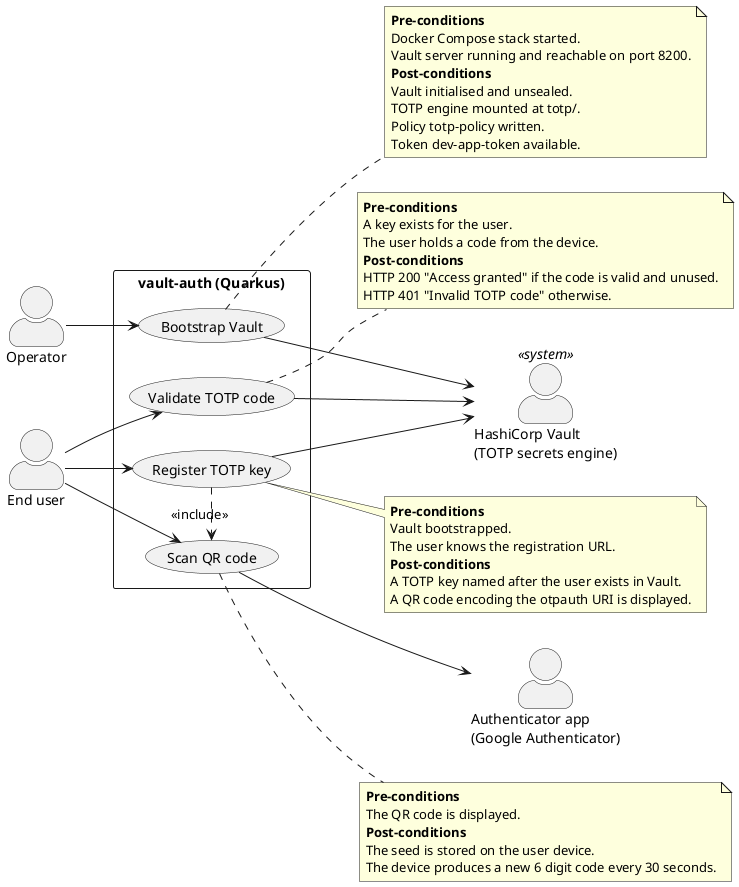
The PlantUML source of this diagram is available in diagrams/use-case.puml.
The operator intervenes only once, by starting the stack, after which the bootstrap is fully automated. The end user performs the enrolment and then the authentication, whereas the authenticator application and Vault participate as secondary actors. It is worth noting that the authenticator application and Vault never communicate with each other. They are like two correspondents who agreed on a secret at their only meeting and who, from that day on, prove their acquaintance merely by consulting their watches.
4. Vault configuration
The Vault configuration consists of three files located in the vault/config directory, which
is mounted read-only in the containers.
4.1 The server configuration in vault.hcl
storage "file" {
  path = "/vault/file"
}

listener "tcp" {
  address     = "0.0.0.0:8200"
  tls_disable = 1
}

api_addr      = "http://0.0.0.0:8200"
disable_mlock = true
ui            = true
The storage stanza selects the file storage backend, which persists the encrypted data of
Vault in the /vault/file directory. This directory is backed by the Docker volume
vault-file, so that the registered TOTP keys survive the restarts of the container. This
choice is deliberate. Vault also offers a development mode, as does the Quarkus Dev Services
mechanism, but both are kept entirely in memory and forget everything when stopped. Such
amnesia is acceptable in a test but rather inconvenient for a user who has just scanned a QR
code and who would discover at the next restart that the application has no recollection of the enrolment.
The listener stanza opens a TCP listener on all network interfaces on port 8200. The
tls_disable directive switches off TLS, which simplifies local development and which would be
an unforgivable sin in any other context.
The api_addr parameter defines the address advertised by the server to its clients, in
particular for request forwarding in a cluster. With a single node its role is modest.
The disable_mlock parameter prevents Vault from calling the mlock system call, whose purpose
is to forbid the operating system to swap memory pages containing secrets to disk. Since
containers generally lack the IPC_LOCK capability, this protection is disabled here. In a
production deployment it should be kept enabled and the capability should be granted.
Finally, ui = true activates the web interface, available at http://localhost:8200/ui,
which is convenient for inspecting the state of the server.
4.2 The access policy in totp-policy.hcl
path "totp/*" {
  capabilities = ["create", "read", "update", "delete", "list"]
}
Vault applies a deny by default model. A token can perform only the operations explicitly
granted by the policies attached to it. The totp-policy policy grants the application the
capabilities create, read, update, delete and list on every path below totp/, and
nothing else. The application can therefore create keys (totp/keys/<name>), generate codes
and validate them (totp/code/<name>), but it can neither read the key/value secrets of other
teams nor alter the configuration of Vault. This is a direct application of the principle of
least privilege. A more restrictive policy is conceivable, for example by removing delete and
list if the application never needs them, and the reader is invited to apply such pruning in
a real deployment.
4.3 The bootstrap script init.sh
The script is executed by the one-shot container vault-init. Its main property is idempotence,
in other words it can be executed any number of times and always leads to the same final state.
It proceeds in six stages.
Waiting for the server.
until vault status 2>&1 | grep -qE 'Initialized|Sealed'; do
  sleep 1
done
The depends_on clause of Docker Compose only guarantees that the vault container has been
started, not that the Vault process is ready to answer. The script therefore polls the
vault status command until its output contains the expected fields. One may observe that the
command returns a non-zero exit code when Vault is sealed, which is why the script examines the
output rather than the exit code.
Initialisation.
if [ ! -s /init/init.json ]; then
  vault operator init -key-shares=1 -key-threshold=1 -format=json > /init/init.json
fi
The initialisation creates the master encryption key, splits it into key shares and produces
the initial root token. It is performed only once, when the file /init/init.json does not
exist or is empty. In production, the master key is typically divided into five shares with a
threshold of three, entrusted to different persons who are expected never to travel on the
same aircraft. Here, one share and a threshold of one are sufficient, and the result is stored
in clear in the vault-init volume. The script comment explicitly warns that this arrangement
is acceptable only for local development.
Unsealing.
UNSEAL_KEY=$(jq -r '.unseal_keys_b64[0]' /init/init.json)
ROOT_TOKEN=$(jq -r '.root_token' /init/init.json)

if vault status -format=json | jq -e '.sealed == true' >/dev/null; then
  vault operator unseal "$UNSEAL_KEY" >/dev/null
fi
With the file storage, Vault is sealed again after each restart. The script extracts the unseal
key and the root token with jq, which is installed on the fly by the container entry point,
and unseals the server only if it is actually sealed.
Enabling the TOTP engine.
export VAULT_TOKEN="$ROOT_TOKEN"

if ! vault secrets list -format=json | jq -e 'has("totp/")' >/dev/null; then
  vault secrets enable totp
fi
Authenticated with the root token, the script mounts the TOTP secrets engine at its default
path totp/, unless it is already mounted.
Writing the policy.
vault policy write totp-policy /vault/config/totp-policy.hcl
This command is naturally idempotent, since writing an identical policy twice leaves it unchanged, and it also guarantees that any modification of the HCL file is taken into account at the next start.
Creating the application token.
if ! vault token lookup dev-app-token >/dev/null 2>&1; then
  vault token create -id="dev-app-token" -policy="totp-policy" \
    -orphan -no-default-policy -period="8760h" -display-name="vault-auth" >/dev/null
fi
This last stage deserves a closer look, since each option carries a precise meaning:
-id="dev-app-token"imposes a known token value, so that the application can be configured statically, which is convenient for development and strongly discouraged elsewhere;-policy="totp-policy"attaches the least-privilege policy described above;-no-default-policyremoves thedefaultpolicy, which would otherwise grant a few additional capabilities, such as looking up the token itself;-orphandetaches the token from its parent, the root token, so that a revocation of the latter does not revoke the application token in cascade;-period="8760h"makes the token periodic, which means that it has no maximum lifetime and remains valid as long as it is renewed at least once a year;-display-name="vault-auth"gives the token a readable name in the audit logs.
The application thus receives a token that can do exactly what it needs and nothing more, which is the ideal relationship between a software component and its privileges, and which is, regrettably, far less frequent in practice than in textbooks.
5. The application code
The vault-auth module is a Quarkus 3.37 application built with Quarkus REST and the Quarkiverse
quarkus-vault extension. Its configuration, in application.properties, is minimal, as shown below.
quarkus.vault.devservices.enabled=false
quarkus.vault.url=http://localhost:8200
quarkus.vault.authentication.client-token=dev-app-token
The Dev Services are disabled for the reason given in section 4.1. The URL and the token
designate the Vault server started by Docker Compose and are overridden by the environment
variables QUARKUS_VAULT_URL and QUARKUS_VAULT_AUTHENTICATION_CLIENT_TOKEN when the
application runs in its own container.
5.1 The service TotpService
@ApplicationScoped
public class TotpService
{
  private VaultTOTPSecretEngine vaultTOTPSecretEngine;

  public TotpService(VaultTOTPSecretEngine vaultTOTPSecretEngine)
  {
    this.vaultTOTPSecretEngine = vaultTOTPSecretEngine;
  }

  public Optional<KeyDefinition> getTotpKeyDefinition(String username)
  {
    CreateKeyParameters params = new CreateKeyParameters("totp-test", username);
    params.setExported(true);
    return vaultTOTPSecretEngine.createKey(username, params);
  }

  public boolean validateCode(String username, String code)
  {
    return vaultTOTPSecretEngine.validateCode(username, code);
  }
}
The class is an application scoped CDI bean, which means that a single instance is shared by
all requests. Its only dependency, VaultTOTPSecretEngine, is supplied by the quarkus-vault
extension and is injected through the constructor, which makes the dependency explicit and the
class easy to instantiate in isolation.
The method getTotpKeyDefinition() creates a TOTP key in Vault. The two-argument constructor of
CreateKeyParameters sets the issuer (totp-test), which the authenticator application
displays as the name of the service, and the account name, here the user name. This constructor
also sets the generate flag to true, which places Vault in its generator role. Vault
therefore creates the seed itself instead of expecting one from the caller. The call to
setExported(true) asks Vault to return the provisioning material, namely the otpauth:// URL
and the QR code as a Base64 encoded PNG image. The key is stored under the path
totp/keys/<username>, so that each user owns a distinct key, and a new registration under the same
name replaces the previous key.
The period, the algorithm and the number of digits are deliberately left to their default values,
namely 30 seconds, SHA1 and 6 digits. This apparent lack of ambition is the result of
experience. During the development of the project, the period was initially set to one minute.
The QR code correctly announced a period of 60 seconds, the authenticator application accepted
it without any objection, and every single code was then rejected. The explanation is that
Google Authenticator ignores the period, algorithm and digits parameters of the URI and
always uses the standard values. The application thus faithfully produced codes for a clock
that ticked twice as often as the one of Vault. The comment in the source code preserves this
lesson for posterity, and the author recommends it to any reader tempted by originality in this
domain.
The method validateCode() delegates the verification to Vault, which recomputes the expected
code for the current time step and its neighbours and compares it with the submitted one. Vault
also records the codes already used and rejects a second submission of the same code within its
validity window, which protects the application against replay attacks at no cost. The method
returns a simple boolean, and the application never manipulates the seed.
5.2 The resource TotpApi
@Path("/totp")
public class TotpApi
{
  @Inject
  TotpService totpService;

  @GET
  public Response testTotp(@HeaderParam("X-User") String username,
                           @HeaderParam("X-TOTP-Code") String code)
  {
    return totpService.validateCode(username, code) ? Response.ok("Access granted").build() :
      Response.status(Response.Status.UNAUTHORIZED).entity("Invalid TOTP code").build();
  }

  @GET
  @Path("/register/{username}")
  @Produces(MediaType.TEXT_HTML)
  public String register(@PathParam("username") String username)
  {
    return totpService.getTotpKeyDefinition(username)
      .map(key -> """
        <!DOCTYPE html>
        <html>
            <head><title>Scan QR Code</title></head>
            <body>
                <h2>Scan this QR code with Google Authenticator</h2>
                <img src="data:image/png;base64,%s" alt="TOTP QR Code"/>
            </body>
        </html>
        """.formatted(key.getBarcode()))
      .orElse("Failed to generate TOTP key");
  }
}
The class is a Jakarta REST resource bound to the path /totp and exposes two endpoints.
The endpoint GET /totp/register/{username} performs the enrolment. It obtains the key
definition from the service and, if it is present, inserts the Base64 encoded image returned by
getBarcode() into a small HTML page by means of a Java text block and the formatted()
method. The image is embedded as a data: URI, so that the browser can display it without any
additional request. If the key definition is absent, a short failure message is returned.
The endpoint GET /totp performs the authentication. The user name and the code are read from
the custom headers X-User and X-TOTP-Code. A valid code produces the status 200 and the body
Access granted, whereas an invalid one produces the status 401 and the body
Invalid TOTP code.
The reader should keep in mind that this resource is a demonstration and not an authentication service ready for production. The registration endpoint is not protected, so that anybody who knows a user name may replace the key of that user, and the absence of a header is not handled specifically. In a real system, enrolment would occur only after a first authentication, for example by password, and the successful validation of the code would lead to the issuance of a session or of a token, typically through the Quarkus OIDC or JWT extensions. These additions are left as an exercise, according to the venerable academic tradition which consists in calling “exercise” what the author did not have the time to write.
5.3 The integration tests
In accordance with the conventions of the project, the tests are integration tests executed against a real Vault server rather than unit tests based on mocks. Two classes are involved.
VaultTestResource implements the QuarkusTestResourceLifecycleManager interface, which
allows Quarkus to start an external resource before the application and to stop it afterwards.
@Override
public Map<String, String> start()
{
  vault = new VaultContainer<>(IMAGE)
    .withVaultToken(ROOT_TOKEN)
    .withInitCommand("secrets enable totp");
  vault.start();
  return Map.of(
    "quarkus.vault.devservices.enabled", "false",
    "quarkus.vault.url", vault.getHttpHostAddress(),
    "quarkus.vault.authentication.client-token", ROOT_TOKEN);
}
The method starts a Testcontainers VaultContainer based on the image hashicorp/vault:1.18,
which is the same version as in Docker Compose. The method asCompatibleSubstituteFor("vault")
informs Testcontainers that the official HashiCorp image may be used in place of the historical
vault image it expects. The container runs in Vault development mode with the root token
root, and the init command mounts the TOTP engine. The returned map overrides the application
configuration, so that the application under test connects to this ephemeral server on its
randomly mapped port instead of the persistent one. Here, the ephemeral nature that was a defect
in section 4.1 becomes a virtue, since each test run starts from a perfectly clean state.
TotpApiTest is annotated with @QuarkusTest, which starts the complete application, and
with @WithTestResource(VaultTestResource.class), which attaches the resource described above.
It contains three test cases written with REST Assured:
registerReturnsQrCode()is a positive test which calls/totp/register/aliceand verifies that the response has the status 200 and contains an embedded PNG image;validCodeGrantsAccess()is a positive test which registersbob, then asks Vault itself to generate the current code by means ofgenerateCode("bob"), and verifies that submitting this code yields the status 200 and the messageAccess granted;invalidCodeIsRejected()is a negative test which registerscarol, submits the code000000and verifies the status 401 and the messageInvalid TOTP code.
The second test is particularly instructive. Since no smartphone could reasonably be attached to
the build server, the test injects VaultTOTPSecretEngine and lets Vault play the role of the
authenticator application. This is possible because the key was created in generator mode, in
which Vault is able to compute the current code for its own keys. The third test relies on the
fact that 000000 is a valid code with a probability of one in a million for any given time
step. Should this test ever fail, the author recommends not correcting it but rather buying a
lottery ticket on the same day.
The tests are executed by mvn -pl vault-auth -am test on any workstation with a running Docker
daemon, and by the CircleCI pipeline, which uses a machine executor precisely so that
Testcontainers has access to a Docker engine.
6. Deployment
The file docker-compose.yml defines three services, two named volumes and one bind mount. The
following diagram represents this topology.
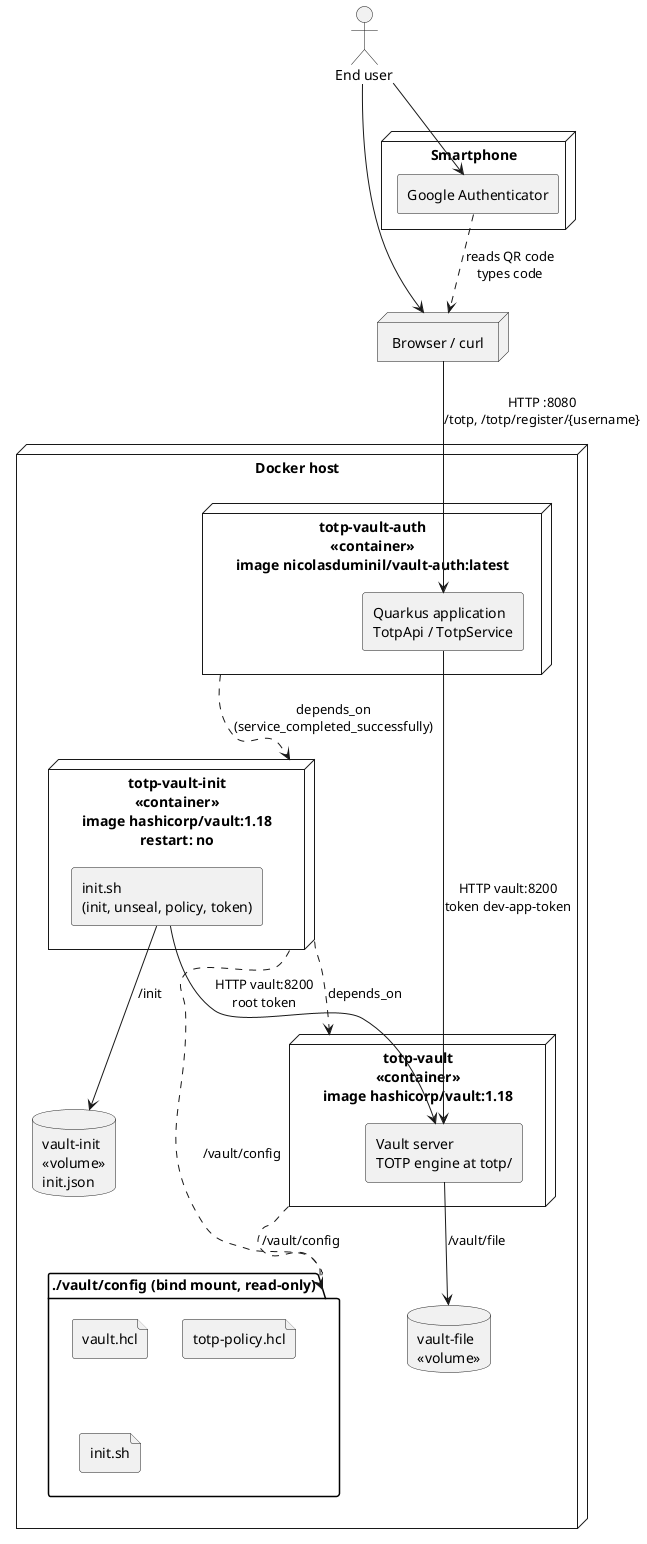
The PlantUML source of this diagram is available in diagrams/deployment.puml.
The service vault runs the Vault server with the configuration of section 4.1. It publishes
port 8200 on the host, stores its encrypted data in the volume vault-file and is restarted
automatically unless it is explicitly stopped.
The service vault-init uses the same image, runs as root in order to be able to install jq
and to write in its volume, executes the script init.sh and then terminates. Its restart policy
is no, which is the expected behaviour of a one-shot task. Its volume vault-init keeps the
file init.json between executions, which is what makes the automatic unsealing possible after a
restart.
The service vault-auth runs the Quarkus application, whose image is produced by the Quarkus
container image extension during the Maven build. The pull_policy: never clause indicates that
the image must exist locally and must not be searched for in a registry. The application starts
only once vault-init has completed successfully, which guarantees that Vault is unsealed, that
the TOTP engine is mounted and that the token dev-app-token exists at the moment of the first
request. Inside the Compose network, the application reaches Vault by its service name, vault,
through the environment variable QUARKUS_VAULT_URL.
The whole stack is started by the following commands.
mvn -pl vault-auth -am package -Dquarkus.container-image.build
docker compose up -d
After that, the user opens http://localhost:8080/totp/register/<username>, scans the QR code
and checks a code with
curl -H "X-User: <username>" -H "X-TOTP-Code: <code>" http://localhost:8080/totp
The command docker compose down -v removes the volumes and returns the system to its original
state of blissful ignorance.
7. Conclusion
This project shows that the implementation of a second authentication factor based on TOTP requires remarkably little application code once the cryptographic responsibilities are delegated to Vault. The Quarkus application contains two short classes and never stores a seed. Vault generates the keys, produces the QR codes, validates the codes and prevents their reuse, while the policy and the periodic orphan token restrict the application to the strict minimum. The integration tests, executed against a real Vault container, give a high degree of confidence in this collaboration without resorting to mocks.
The simplifications adopted for local development, namely the single unseal share stored in clear, the disabled TLS, the fixed token value and the unprotected registration endpoint, must of course be removed before any production use. With this reservation, the approach offers a sound basis on which an authentication service may be built, and the author hopes that the reader, having reached this conclusion without falling asleep, will consider this a valid proof of presence, comparable in rigour to a six digit code.